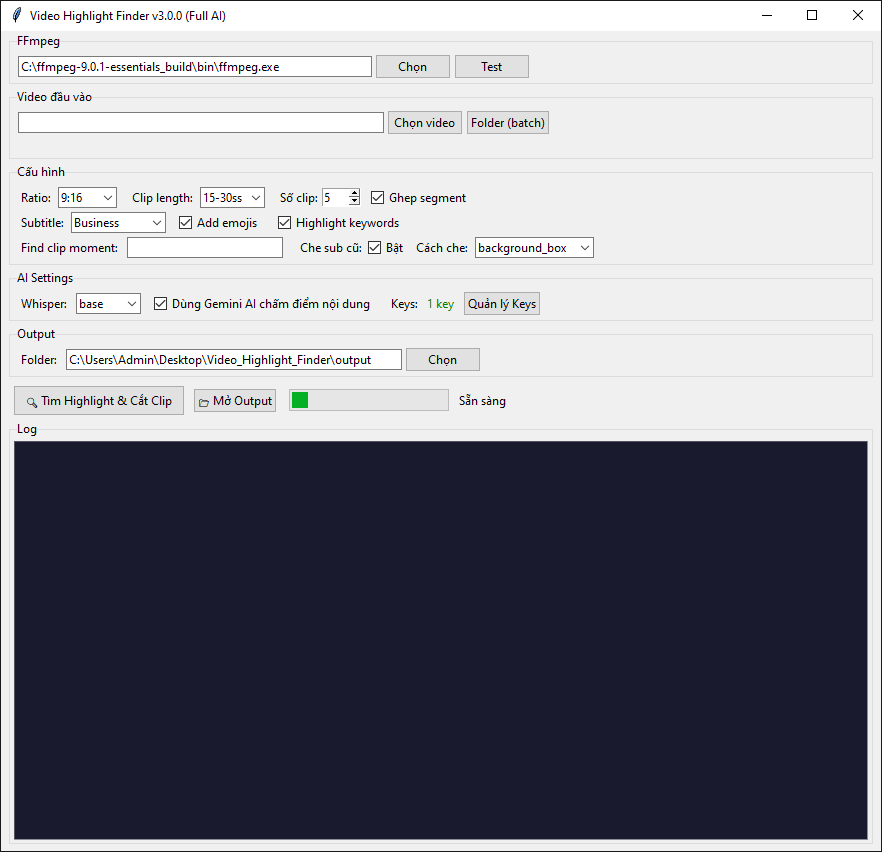
Find the moment.
Cut the clip.

ClipSpotter scans your video for the loud, the tense and the sudden — the shout, the pause, the scene change — then cuts those moments into ready-to-post clips.

Get it — $15.99 $15.99 · one-time · launch price, then $39
ClipSpotter desktop app
The whole app. No account, no upload, no cloud.

Three steps, no timeline work

No scrubbing through two hours of footage looking for the good part. Point it at a file, pick your format, walk away.

1

Drop in a video

One file, or a whole folder for batch mode. MP4, MOV, MKV, WEBM — anything ffmpeg reads.

2

Pick your format

9:16 for Reels and Shorts, 1:1 for feed, 16:9 for YouTube. Choose clip length and how many you want.

3

Get clips back

Each clip is cut, reframed, subtitled and sitting in the output folder, ready to upload.

What it actually listens for

Five audio signals and scene detection, scored together. Not a random splitter.

🔊

Volume energy (25%)

RMS loudness. The parts where someone raises their voice score higher.

⚡

Sudden spikes (20%)

Rate of change in loudness — a shout, a slam, a reaction.

💬

Speech rate (25%)

Voiced density. Fast, excited talking beats slow narration.

⏸

Pause before peak (15%)

The silence before the drop — the setup that makes a moment land.

🎚

Pitch variation (15%)

Spectral centroid deviation. Emotional delivery, not flat reading.

🎬

Scene changes

ffmpeg scene detection adds bonus weight when the picture cuts too.

🧩

Segment stitching

Rather than one flat 30-second block, it takes the top-scoring moments and joins them in time order.

💅

Five subtitle styles

Default, Modern, Bouncy, Mr. Beast, Business — with optional emojis and keyword highlighting.

📁

Batch folders

Queue 50 videos overnight. Clips land in one flat output folder, named by source.

One price. No subscription.

Opus Clip and Vizard charge around $29 a month. This is $15.99 once, and it runs on your machine.

$15.99 USD
one-time payment · lifetime license
Launch price — goes to $39 after launch
  • Unlimited videos — no per-minute credits
  • All three aspect ratios, all five subtitle styles
  • Batch mode for whole folders
  • Runs offline — footage never leaves your machine
  • Free updates for the life of the product
  • Activate on 2 machines
Buy now — $15.99
Instant download + license key after payment.
Secure checkout by Creem. VAT added where applicable.

Questions

What do I need installed?

Windows 10 or 11, 64-bit, Python 3.10+, and FFmpeg. The first launch pulls the Python packages (numpy, OpenCV, faster-whisper) from PyPI — about 1 GB, once, and it needs a connection. After that the tool runs from the downloaded folder. FFmpeg is a free install from ffmpeg.org; the app also has a setting to point at an existing copy.

Does it upload my video anywhere?

No. Everything is processed locally with ffmpeg and OpenCV. There is no account, no server, no telemetry. You can run it with the network unplugged once the first-launch install is done.

Windows only?

Yes, Windows 10 and 11. A Mac build isn't available yet.

How good is the detection?

It reliably finds the loudest and most dynamic passages, which is what most reaction, gaming, podcast and commentary footage needs. It is not a semantic model — it doesn't understand what is being said. Expect to occasionally skip a clip that isn't for you. That's why there's a "find clip moment" keyword box for when you know what you're after.

What if it doesn't work on my machine?

Email us and we'll fix it. If we can't get it running, we refund you in full within 14 days of purchase.

Can I use the clips commercially?

The clips are yours — that's just your own footage re-cut. The licence covers the software, not any third-party material you feed into it.